Brass tacks: A demo and some code.
window.matchMedia provides a way for Javascript to react when a media query condition is met or unmet. While the functionality it allows is great, the necessary code duplication required to use it leaves a bit to be desired. I'm going to walk through a work-in-progress approach to getting around that duplication.
The method is simple enough to use and works the way you'd expect it. You give it a media query string it gives you back a MediaQueryList object.
var mql = window.matchMedia("(min-width: 480px)");
That sets the value of mql to a MediaQueryList object with two members, something like:
MediaQueryList: {
  matches: true,
  media: "(min-width: 480px)"
}
The boolean value of the matches member will be determined by the width of your browser window at the time.
You can add event listeners to MediaQueryList objects. An event will fire each time the condition is triggered. This allows you to be updated on the status of the media query without having to resort to polling or a window.resize event. Using mql from above we can set up a listener and handler like so:
mql.addListener(handleMediaChange);
handleMediaChange(mql);

var handleMediaChange = function (mediaQueryList) {
if (mediaQueryList.matches) {
// The browser window is at least 480px wide
}
else {
// The browser window is less than 480px wide
}
}
You can find similar code examples and further explanation of MatchMedia on the Mozilla Developer Network
MatchMedia works pretty well. As usual there are some caveats that I'll mention later. My issue is with needing to specify the media query when you create the MediaQueryList. If you wanted an event to fire for every media query you might have, you'd have manually copy each from your stylesheets to you JS. Every time you update a media query in CSS, you'd have to do the same in JS. What I want is a script to look at a page's stylesheets, pick out all the media queries and create a MediaQueryList for each one.
When I first started looking into this I thought I was in for some really hairy stuff. I imagined myself having to make ajax requests to fetch stylesheets, use weird regexes to find the @media rules, and employ other types of not-so-fun things. Luckily, this did not turn out to be the case.
I've written small script that accomplishes the tasks I'm after, mqEvents.js is on Github and a working example is at tylergaw.github.com/media-query-events.
(function () {
var mqEvents = function (mediaChangeHandler) {
var sheets = document.styleSheets,
numSheets = sheets.length,
mqls = {},
mediaChange = function (mql) {
console.log(mql);
}

        if (mediaChangeHandler) {
            mediaChange = mediaChangeHandler;
        }

        for (var i = 0; i < numSheets; i += 1) {
            var rules = sheets[i].cssRules,
                    numRules = rules.length;

            for (var j = 0; j < numRules; j += 1) {
                if (rules[j].constructor === CSSMediaRule) {
                    mqls['mql' + j] = window.matchMedia(rules[j].media.mediaText);
                    mqls['mql' + j].addListener(mediaChange);
                    mediaChange(mqls['mql' + j]);
                }
            }
        }
    }

    window.mqEvents = mqEvents;

}());
I'm going to go through the code here and explain what's happening each step of the way.
var mqEvents = function (mediaChangeHandler)
The mqEvents function takes a single parameter, a function that will be called each time a media query is triggered.
var sheets = document.styleSheets,
numSheets = sheets.length
The document contains an object of all loaded stylesheets. Our sheets variable is a list of StyleSheet objects. numSheets is stored for convenience for when we loop over the list of stylesheets.
mediaChange = function (mql) {
console.log(mql);
}

if (mediaChangeHandler) {
mediaChange = mediaChangeHandler;
}
If the mediaChangeHandler argument is not passed to mqEvents, a default function, mediaChange will handle each media query event. The default doesn't do much of anything. For the purpose of this script we just want to have something there.
for (var i = 0; i < numSheets; i += 1) {
var rules = sheets[i].cssRules,
numRules = rules.length;
Here we're looping over our sheets list to look at each loaded stylesheet. The rules variable is list of all the rules of the current stylesheet represented as CSSRule objects.
This is where things take a turn for the awesome.
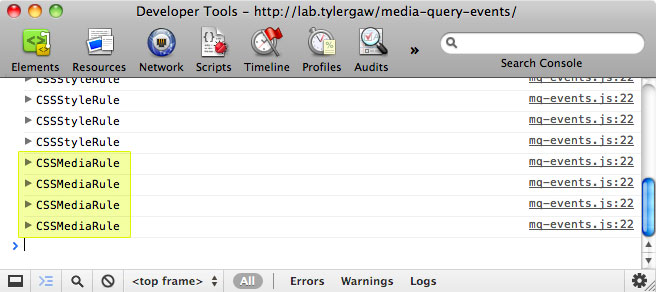
At the start of this I was aware that all a document's stylesheets could be accessed and that all the rules of the stylesheets were represented by CSSRule objects, but what I didn't know was that CSSRule objects that contain a media query have a unique name. Take a look at this screen shot of the console when logging out each CSSRule object:
Regular CSS rules have the name "CSSStyleRule" while media queries have the name "CSSMediaRule". This is great because it gives us an easy way to pluck out only the media queries from our stylesheets without needing to resort to string parsing, which can get ugly quickly.
(It looks like other types of rules like font-face and keyframes have unique names too.)
for (var j = 0; j < numRules; j += 1) {
if (rules[j].constructor === CSSMediaRule)
We can now loop over each rule in the stylesheet and check to see if it is a media query. The condition here, checking to see if the constructor matches the name "CSSMediaRule", was also new to me. I found that approach in a thorough Stack Overflow answer on the topic.
mqls['mql' + j] = window.matchMedia(rules[j].media.mediaText);
mqls['mql' + j].addListener(mediaChange);
mediaChange(mqls['mql' + j]);
Now that we know we're only dealing with media queries, we're free to use them with matchMedia to create MediaQueryList objects, bind events to those and handle them with a given handler function. This bit of code is nearly the same as the matchMedia example. The noticeable exception here is that each MediaQueryList object is being added to a hash, mqls, that we created earlier. We could accomplish the same thing without putting each object in the hash, this was more of a forward-thinking thing. I have a feeling that there could be a use for holding on to all of the objects to access them later.
So why would you use this and what happens when you do? In the demo I linked to, this is the implementation:
var msg = document.getElementById('condition'),
handleMediaChange = function (mql) {

    // For some reason Firefox has trouble always running this code.
    // The console.log seems to help it.
    // TODO: Figure out what the hell that's all about
    console.log();

    if (mql.matches) {
        msg.setAttribute('class', 'met');
        msg.innerHTML = 'The condition "' + mql.media + '" was met.';
    }
    else {
        msg.setAttribute('class', 'unmet');
        msg.innerHTML = 'The condition "' + mql.media + '" was not met.';
    }

};

mqEvents(handleMediaChange);
Notice the big comment about Firefox there, I still don't know what that is. Like I said, work-in-progress here.
What this does is update a the DOM element, represented by msg, each time a media query is triggered. mqEvents doesn't try to react differently to specific media queries. It calls the same handler each time one is triggered. The handler function, however, does receive information about the media query. It knows what the media query is–which I'm placing in the DOM with mql.media–and if the condition was met by the window–which I'm checking with mql.matches.
Maybe parts of the page layout are done with Javascript and need to be updated each time a media query is triggered. Maybe it could be used to do conditional loading of images, scripts, fonts, or the like. This type of conditional loading of assets could be used to help reduce the bandwidth usage on mobile devices.
If a page has a lot of media queries, mqEvents is going to add a lot of event listeners and it's going to be calling the handling function a lot of times. I haven't run into anything problematic with my small demo page, but I'd be curious to see the impacts on performance on a page with a substantial number of media queries.
With all these fancy new things browser support is a big question. matchMedia is not supported very well yet. According to caniuse.com we're looking at Chrome 17+, Firefox 9+, Safari 5.1+, iOS Safari 5.0+, IE 10+ (with an ms prefix), and no support yet for Opera. For unsupported browsers a polyfill could be employed. Here's a good one right here.
As I was working on this I found out about a related project named Harvey. I haven't used it yet, but it looks really good. It looks like it still has that duplication of media queries issue, but if you're looking for targeted reactions to specific media queries it might be the way to go.
Thanks for reading