Browsers Should Have a Native Control for Per-Site Color Scheme
Note: This is a proposal for a browser feature. All the demos are mock ups and the feature-specific code is made up. As far as I know, nothing like this is in progress by any browser.
Best place to start is a demo. Here’s how this would work in Chrome:
The UI shouldn’t be surprising. There’s a color scheme button in the URL bar. Tapping it shows a popover that contains a select. The select options are the site’s available color schemes. Choosing an option sets the color scheme for that site.
Just like page zoom, color scheme selection persists for that site.
More browser examples and different scenarios below.
Motivation
Right now, every site with multiple color schemes has to implement a custom control in HTML, CSS, and JavaScript to let the user change the scheme. Or there’s only code in place to respect the OS-level appearance setting with no in-site control to change it.
Both of those feel wrong.
Sites with multiple themes, at least light and dark, is widespread enough that it feels standard. But, as a user, having to track down the custom color scheme control on every site is a pain. Sometimes it’s in the header. Sometimes it’s in a sidebar. Sometimes it’s tucked away in a settings menu or page. And some of you psychos put it at the very bottom of an incredibly long page, I think because you’re out to get me.
Relying only on the OS-level appearance is less than ideal. Using dark mode at the OS-level, but then light mode for certain websites is common. Which scheme a user wants could depend on the content, the time of day, the quality of the scheme design, or maybe just how their eyes are feeling that day. There’s no one correct setting.
Side note: Your dark scheme background is too dark and foreground too bright. My retinas are burning.
Along with usability, site authors shouldn’t have to reimplement this control for every site they build. They should be able to design their color schemes in CSS and opt in to the native control.
Prior art
This almost exists in a couple places. In Chrome, you can set a browser-level scheme override with Settings > Appearance > Mode. You can choose from: Light, Dark, or Device. This overrides the OS-level scheme. But, it’s for the entire Chrome UI and applies to every site.
Firefox is even closer. You can set a site-level scheme with Settings > General > Website appearance. You can choose from: Automatic, Light, and Dark. This setting doesn’t change the Firefox UI, only sites. But, it applies to every site.
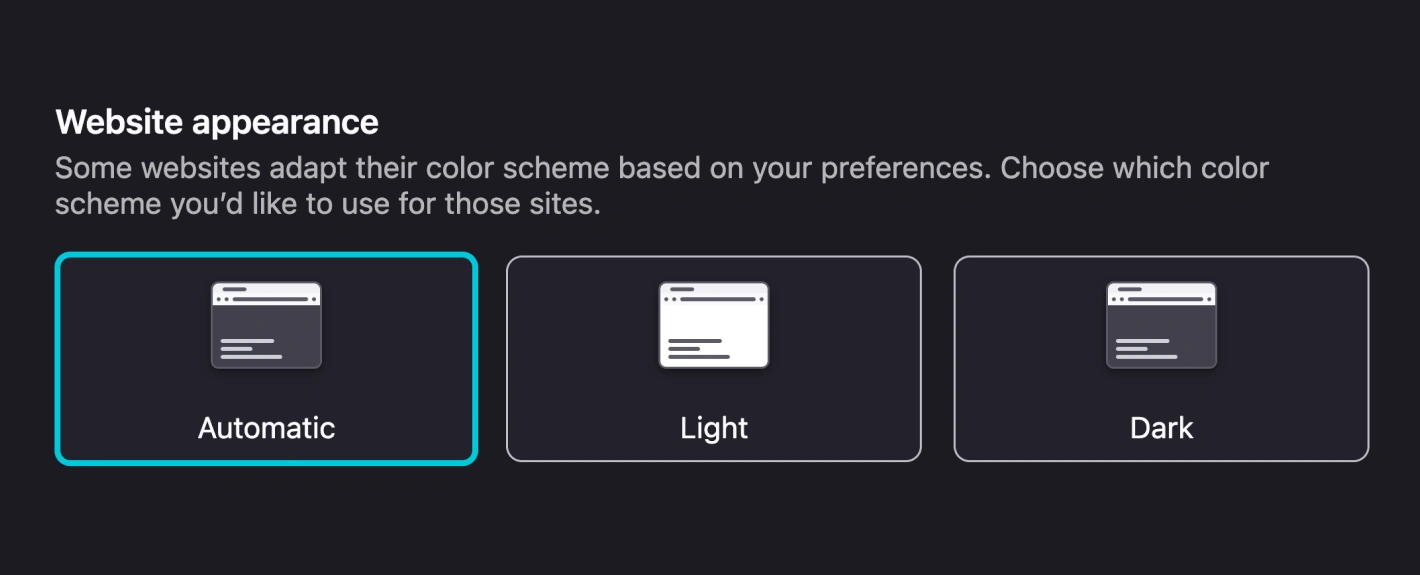
Safari doesn’t seem to have anything like this. Zen, which I use, is based on Firefox so it works the same way. I’m not sure about others like Brave, Vivaldi, et al.
So Firefox is close, but we need per-site control.
Opting in
The good news here is I think we have everything we need already. Today, we use color-scheme, light-dark, and prefers-color-scheme to create schemes.
:root { color-scheme: light dark; }

body {
  color: light-dark(black, white);
  background-color: light-dark(white, black);
}

@media (prefers-color-scheme: dark) {
  body { font-size: 95%; }
}
For a site to tell browsers they want to opt-in to showing the color scheme control, I propose we require a color-scheme meta tag.
<meta name="color-scheme" content="light dark">If a site doesn’t have the color-scheme meta tag, the color scheme button would not show up.
Note that the color-scheme meta isn’t required for prefers-color-scheme or light-dark() to work.
Using something in the document, as opposed to CSS, feels more solid for signaling to the browser that a site has color schemes and wants to display the control.
Handling lack of support
Not all browsers will implement this at the same time. Some may not at all. Each site, depending on the audience, could decide that’s OK. Users with unsupported browsers won’t have a color scheme control. The OS-level setting will dictate the scheme.
That might not work though. Sites should be able to detect support for the native scheme control.
This should be a simple check for support in JavaScript:
if (!navigator.colorScheme) {
  // Setup and display custom color scheme control
}
In those cases, sites can implement a custom in-page control. Not ideal, but ensures all users are able to change the color scheme.
Again, navigator.colorScheme is something I’m making up, not something real today. The important part is site authors have some way to detect support.
Implementation
This section is a rough overview of how I’d implement this in a browser.
Initialization:
- Check for
color-schememeta in document - Parse
color-schememetacontent - Each space-separated item from
contentis an available scheme - Display the color scheme button
- For each available scheme, add an option to the color scheme select
- If there is a persisted user-selected color scheme, set the button and select to it
Browsers only need to set things up. It’s not the responsibility of the browser to ensure valid CSS exists for each scheme. That’s the responsibility of the author.
When user changes scheme:
- Set the preferred color scheme for this site to the user selection
- Persist the preferred color scheme
- Set the color scheme button icon to one of: system, light, dark, custom
I’m hand-waving on #1 because I don’t know how it works today, but I know it works. This should be a similar mechanism to how each site respects the OS-level or browser-level (like the setting in Firefox) color scheme setting.
Preference order
Color scheme can be set in a few different places: OS, browser, site. Those could all be different. The preference is: 1) Site 2) Browser 3) OS.
Example: if OS is set to auto, browser is set to dark, and site is set to light, the site will use the light scheme.
Odds and ends
A few things that came up, but I didn’t dive deep into:
- Scheme storage by origin: the preference is per-origin, not per-page. Subdomains are separate.
- Sync across devices: preference should probably sync via existing browser sync infrastructure (Chrome Sync, Firefox Sync). Though maybe it shouldn’t sync between desktop and mobile.
- Incognito/private browsing: doesn't read or write per-site scheme preferences.
- Reset behavior: Selecting “System” clears the per-site preference entirely, back to the default. Just like setting zoom to 100%.
- Dynamic meta tag changes: If JS changes the meta tag without a navigation, the browser should re-read it and update the control. If the stored preference is no longer in the list, fall back to system.
Precedent
When adding a new feature like this, it’s important to find precedent. There’s not an exact match, but there are two examples—in Chrome at least—that have similar ideas. Page zoom and service workers.
Page zoom is relevant because it’s a control on the browser UI that changes how each site displays. By using different font sizes and font size units, site authors have some control over how a site behaves when zoomed. Also, in Chrome, Firefox, Zen, and likely others, a button/indicator displays in the URL bar when zoom level is not 100%.
Service workers have only a slight relevance. When a site includes a properly configured manifest and service worker, in Chrome, an Install button appears in the URL bar. This is the one example I found where site author code results in a browser UI element being displayed.
So, again, the color scheme control proposal isn’t 1:1, but it’s also not completely unheard of.
Custom schemes
Right now, the color-scheme property and meta tag only support light and dark. But the spec is open-ended. The definition includes a <custom-ident> as a placeholder for custom schemes. That’s only a proposal though, so don’t get too excited. Bramus wrote about this in “The Future of CSS: Easy Light-Dark Mode Color Switching with light-dark().”
There’s no reason this feature can’t follow the same path. Say a site has a custom sepia scheme it wants to make available. The author declares it with the color-scheme meta:
<meta name="color-scheme" content="light dark sepia">And sets it up in the CSS:
:root { color-scheme: light dark sepia; }
/* scheme styles go here */
The sepia theme would then be available in the color scheme control:
More examples
In Chrome and Firefox, the scheme button would slot in with any other contextual buttons. Would work the same. Here’s the URL bar of an installable site that’s zoomed in and has available color schemes:

Firefox is nearly the same as Chrome, with a scheme popover that includes a select for available schemes. This mock up isn’t as complete, but this is the idea.
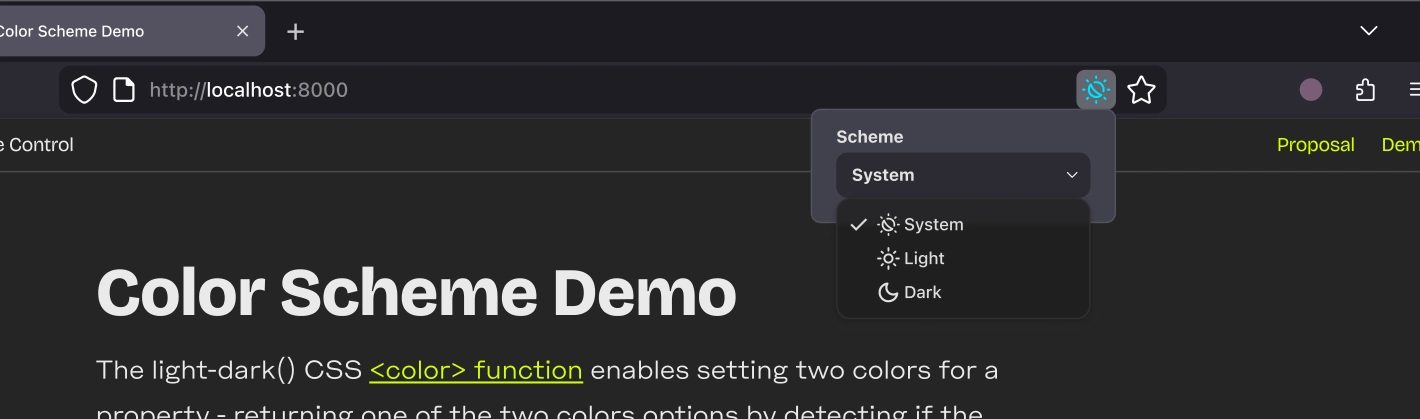
Zen uses a sidebar for URL and tabs. It also has contextual buttons in the URL bar. That’s where the scheme control would go. I don’t have a mock up of the selection UI, but Zen uses pretty standard popovers and selects.

Safari is interesting. It doesn’t really do contextual buttons in the URL bar. It has a reading list and I think reader view, but I didn’t see any others. I don’t see any future where Apple gives up URL bar real estate for this. That means this one would be a bit less discoverable. What it does have is a Site settings button. That opens a popover and one of the items in there is page zoom. Not my favorite, but the scheme control could slot right in there.
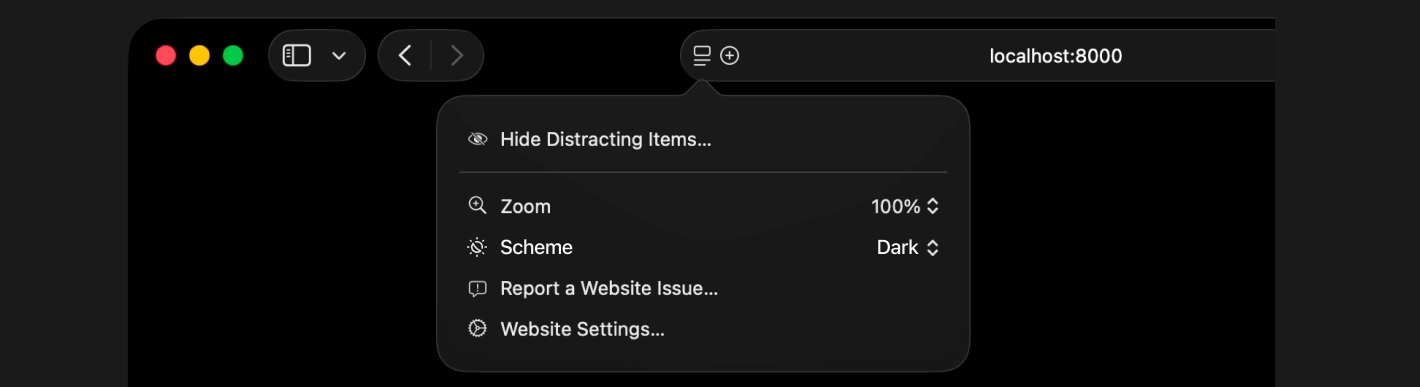
This fits nicely with the trajectory and current status of color-scheme, light-dark(), and related specs. This wouldn’t have been a good idea, say, 2 years ago. We just didn’t know enough yet. But now, feels like we have a solid foundation to build on.
I don’t know what the processes are for getting a feature like this in various browsers. I’m sure it’s different for them all. The first step is this, just getting it written down and in front of people. I know I’d use this many times a day every day. Now to see if anyone else would too.
This post is also available as Markdown. If you have thoughts or questions about it, find me on Bluesky, Mastodon, or email me@tylergaw.com.